Can Video Quality Be Improved? Science vs Hype (2026)

Can video quality actually be improved, or is it all marketing hype? The answer is yes, but with important caveats. Modern AI tools can dramatically enhance video quality, but only when the source material contains enough information to work with. Understanding the difference between what can be improved and what cannot helps you set realistic expectations and choose the right approach for your footage.
This article separates the science from the hype, explaining exactly what video enhancement can achieve and where it hits hard limits. We'll cover the technical reality behind AI enhancement, the measurable quality metrics used by platforms like Netflix and YouTube, and practical scenarios where improvement makes sense versus when it's a waste of time.
The Short Answer: Yes, but with a "But"
Video quality can be improved, but the method and results depend entirely on what's wrong with your source material. The fundamental distinction is between interpolation (mathematical guessing) and generative reconstruction (AI-powered prediction based on training data). Understanding this difference explains why some enhancements work beautifully while others produce disappointing or even worse results.
The Difference Between Interpolation and Generative Reconstruction
Traditional video enhancement uses interpolation: mathematical algorithms that guess what pixels should exist between known points. If you're upscaling 1080p to 4K, interpolation stretches existing pixels across a larger canvas, creating a larger image but not necessarily a sharper one. The algorithm is essentially filling gaps with educated guesses based on neighboring pixels.
Modern AI enhancement uses generative reconstruction: neural networks trained on millions of video frames that predict what higher-quality footage would look like. Instead of just stretching pixels, AI analyzes patterns and textures to create new detail that fits the content type. The AI recognizes "this looks like a face" and generates detail based on how faces appear in high-resolution training data.
The key difference: Interpolation preserves what exists but doesn't add new information. Generative reconstruction creates plausible new detail, which works well for natural content but can introduce artifacts if the source material is too degraded.
Defining the "Threshold of Recovery": When a Video is Too Far Gone
Every video has a threshold beyond which meaningful improvement becomes impossible. This threshold depends on several factors: resolution, bitrate, focus, motion blur, and compression artifacts. Understanding where your footage sits relative to this threshold helps you decide whether enhancement is worth attempting.
The threshold varies by content type. A well-lit 720p video with minimal compression can be enhanced dramatically, while a dark, heavily compressed 240p video with motion blur will produce disappointing results no matter which tool you use. The AI needs enough source information to make accurate predictions. Below a certain quality threshold, the AI is guessing more than analyzing, which produces unreliable results. For a detailed breakdown of when video enhancers work versus when they fail, see our guide.
What Can Be Improved (The Success Stories)
Modern AI enhancement excels in specific scenarios where the source material has sufficient information for the AI to work with. Understanding these success stories helps you identify when enhancement is worth pursuing.
Low Resolution: Turning SD/720p into Crisp 4K
Upscaling from 720p or 1080p to 4K is one of the most reliable enhancement scenarios because these resolutions contain substantial detail that AI can use to predict what 4K would look like. The 2x to 4x upscaling factors are within the safe range where AI predictions remain accurate.
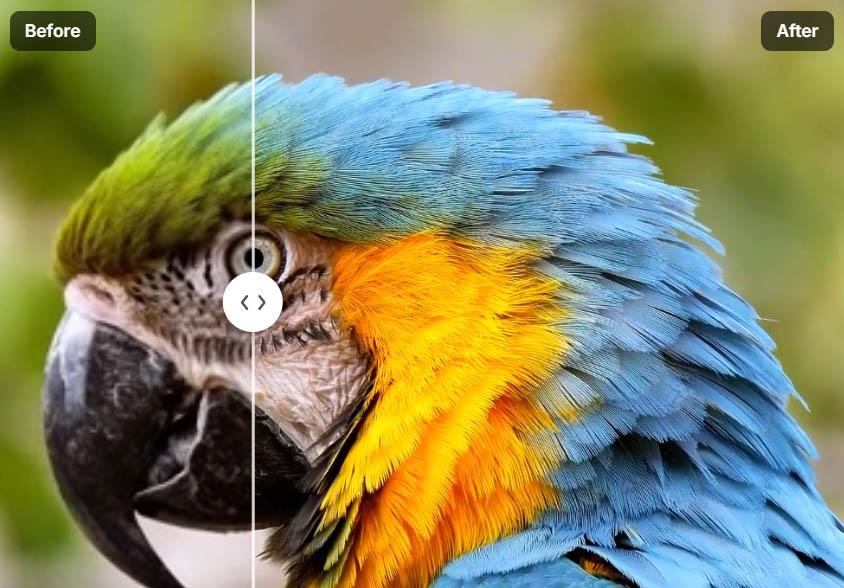
This works particularly well when the source footage was originally recorded at high bitrate and minimal compression. The AI has enough information to recognize patterns and textures, allowing it to generate realistic detail rather than just stretching pixels. Tools like Video Quality Enhancer use advanced AI models specifically trained for upscaling, producing results that look natural rather than artificially sharpened.
The key is starting with decent source material. A 720p video recorded at 10 Mbps will upscale better than a 1080p video recorded at 2 Mbps, because the higher bitrate preserves more information for the AI to work with.
Digital Noise: Cleaning up "Grainy" Low-Light Smartphone Footage
Smartphone cameras struggle in low light, producing grainy, noisy footage. AI denoising tools excel at removing this sensor noise while preserving actual detail, creating a difficult balance that traditional denoising methods fail to achieve.

The AI distinguishes between noise (random, frame-to-frame variations) and real detail (consistent across frames). By analyzing multiple frames together, the AI identifies what's noise and removes it selectively, keeping textures, edges, and important details intact. This temporal analysis is crucial—single-frame denoising would blur everything, but multi-frame analysis allows selective noise removal.
This works because noise has specific characteristics: it's random, changes between frames, and appears as grain or color speckles. Real detail is consistent and follows patterns. The AI uses this distinction to remove noise while preserving the information that matters, resulting in cleaner footage that looks more professional.
Frame Rate: Making Choppy 15fps Footage Look like 60fps "Butter"
Frame interpolation creates new frames between existing ones, converting low frame rate footage to higher frame rates for smoother playback. This works by analyzing motion between frames and predicting what intermediate frames should look like. The AI understands how objects move, so it can create realistic in-between frames.
This technique is particularly effective for simple, predictable motion. A person walking, a car driving, or a camera panning all have consistent motion patterns that the AI can interpolate accurately. The result is smooth 60fps footage from 15fps or 24fps source material, creating that "butter-smooth" playback effect.
The quality depends on the motion complexity. Simple motion interpolates well, while complex scenes with many overlapping objects or fast motion blur can create artifacts. Understanding these limitations helps you choose when frame interpolation will improve quality and when it might introduce problems.
Color Depth: Up-Converting 8-bit SDR to a Simulated HDR Look
Color enhancement can improve perceived video quality by expanding the color range and improving contrast. While true HDR requires 10-bit or 12-bit source material, AI tools can simulate HDR-like appearance from 8-bit SDR footage by enhancing contrast, expanding color gamut, and improving perceived depth.

This works because our brains interpret contrast and color relationships as indicators of quality. By carefully adjusting shadows, midtones, and highlights separately, AI can create a three-dimensional feel that makes flat footage appear more detailed and vibrant. The result isn't true HDR, but it creates a similar perceptual effect.
Tools like Video Quality Enhancer use advanced color processing to enhance contrast and color depth, creating results that look more professional without requiring HDR source material.
What Cannot (Easily) Be Improved (The Hard Limits)
Not all video problems can be fixed, even with advanced AI. Understanding these hard limits helps you avoid wasting time and money on footage that won't improve.
Optical Blur: If the Lens Was Physically Out of Focus
If the lens wasn't focused on your subject, the camera never captured sharp detail—it only recorded a blurry version. No amount of AI processing can create sharp detail from out-of-focus footage because that detail doesn't exist in the source material.

AI sharpening algorithms can enhance edges and increase contrast, which might make slightly soft footage appear sharper. But genuinely out-of-focus footage will remain blurry. The AI might try to sharpen the blur, but this creates halos and artifacts rather than recovering lost detail. The only solution for out-of-focus footage is to reshoot with proper focus.
This is a fundamental limitation of information theory: you can't recover information that was never recorded. If the camera's lens wasn't focused, it never captured the sharp version of that moment, so no amount of processing can create it.
Severe Motion Blur: Fast-Moving Objects That Are Just a "Smear"
Motion blur occurs when objects move faster than the camera's shutter speed can capture. The blur represents information that was never recorded—there's no sharp version of that moment to recover. When AI tries to enhance heavily blurred footage, it attempts to sharpen the blur itself, which creates strange, vibrating textures that look worse than the original.
Heavy motion blur is one of the few scenarios where enhancement can actually make footage look worse. The AI sees blur patterns and tries to interpret them as detail, leading to artifacts like wavy lines, distorted edges, and unnatural sharpening. If your source material has significant motion blur, enhancement won't help and may introduce new problems.
The solution is to work with footage that has minimal motion blur, or to accept that some moments simply can't be recovered. Fast action shots with heavy blur are better left as-is rather than attempting enhancement that will create artifacts.
Extreme Compression: When "Blocky" Artifacts Have Destroyed Textures
Heavy compression destroys information by removing detail to reduce file size. When compression artifacts are severe—blocky patterns, color banding, or destroyed textures—the AI has very little information to work with. The AI might try to smooth out the blocks, but it can't recreate detail that compression removed.
This is particularly problematic for faces and eyes, which require fine detail to look natural. If compression has destroyed the texture of a face or the detail in eyes, even the best AI can't fully recover it. The AI might generate plausible-looking detail, but it's essentially guessing what should be there rather than recovering what was lost.
The threshold depends on bitrate. If your source video is under 2 Mbps, even the best AI will struggle because there isn't enough data for the AI to analyze. High-resolution footage with low bitrate often looks worse after enhancement because the AI is trying to create detail from heavily compressed, information-poor source material.
The Science of the "CSI Effect"
The "CSI effect" refers to the unrealistic expectation that any video can be enhanced to reveal perfect detail, like in crime shows. The reality is more nuanced: AI enhancement creates highly accurate "re-imaginings" rather than recovering lost information.
How AI "Hallucinates" Detail
AI enhancement uses datasets of millions of faces, objects, and scenes to guess what your subject should look like at higher quality. When you feed a low-resolution face to an AI upscaler, it doesn't just stretch pixels. Instead, it recognizes "this is a face" and generates detail based on how faces appear in high-resolution training data.
This process creates detail that looks plausible and natural, but it's not necessarily what was in the original footage. The AI is essentially creating a "best guess" reconstruction based on patterns it learned from millions of examples. This works well when the source material has enough information for the AI to make accurate predictions, but it can produce artifacts when the source is too degraded.
The important insight: It's not your original video anymore—it's a highly accurate "re-imagining" based on AI predictions. This distinction matters because the enhanced video represents what the AI thinks should be there, not necessarily what was actually captured.
Temporal Consistency: The Hidden Quality Factor
Most "Can I fix this?" articles ignore temporal consistency, but it's crucial for perceived quality. A single frame might look great after enhancement, but if the improvement "flickers" or "wobbles" over 10 seconds, the quality actually decreases for the human eye.
Temporal consistency algorithms ensure that enhancement remains stable across frames. Instead of processing each frame independently, advanced tools analyze multiple frames together, using information from surrounding frames to maintain consistency. This prevents the flickering and frame-to-frame variations that plague single-frame processing. For practical methods to fix video quality issues, including temporal consistency techniques, see our step-by-step guide.
Tools like Video Quality Enhancer use temporal consistency algorithms to ensure flicker-free results, maintaining stability throughout the video. This is why professional enhancement tools process videos with full temporal awareness rather than frame-by-frame.
The "VMAF" Perception Score: Measurable Quality
Netflix and YouTube use the VMAF (Video Multi-method Assessment Fusion) metric to decide if a video is "high quality." This metric combines multiple quality measurements into a single score that correlates with human perception. Understanding that quality is a measurable score, not just a feeling, adds authority to enhancement discussions.
VMAF considers factors like resolution, bitrate, frame rate, and perceptual quality metrics. A video with high VMAF score will look better to viewers than one with a low score, even if both are technically the same resolution. This is why enhancement tools focus on improving VMAF scores, not just increasing resolution.
The insight for users: Quality improvement isn't subjective—it's measurable. When an enhancement tool improves your video's VMAF score, you're getting objectively better quality, not just a different look.
Physical vs. Digital Improvement: The Stabilization Trade-Off
Most articles only talk about software, but physical vs. digital improvement matters. Stabilizing shaky video is a common enhancement, but it comes with a trade-off: digital stabilization works by cropping and zooming the frame to compensate for movement.
Unless done with high-end AI stabilization, this cropping reduces quality by removing pixels from the edges. The stabilized video might look smoother, but it's actually lower resolution because parts of the frame were cropped away. This is "Post-Processing Physics"—digital operations that seem to improve quality but actually reduce it.
AI-powered stabilization can minimize this quality loss by using intelligent cropping and frame analysis, but even the best stabilization requires some cropping. Understanding this trade-off helps you decide when stabilization is worth the quality cost.
The Checklist: Can Your Video Be Saved?
Use this checklist to evaluate whether your video is a good candidate for enhancement.
Step 1: Is the Subject Recognizable?
If you can't recognize the subject in the original footage, enhancement won't help. The AI needs enough information to make accurate predictions. If a face is so blurry or low-resolution that you can't tell who it is, the AI will struggle to create a recognizable version.
The threshold varies: a slightly soft face can be enhanced effectively, but a completely unrecognizable blur cannot. Assess whether your footage has enough detail for the AI to work with before investing time and money in enhancement.
Step 2: Is the Noise "Static" or "Movement"?
Static noise (grain, sensor noise) can be removed effectively, but movement-related problems (motion blur, camera shake) are harder to fix. Understanding the difference helps you choose the right enhancement approach.
Static noise is consistent and random, making it easy for AI to identify and remove. Movement problems represent information that was never captured, making them much harder to address. If your footage has heavy motion blur or severe camera shake, enhancement might not help and could make things worse.
Step 3: Do You Have the GPU Power (or the Budget for the Cloud)?
Enhancement requires significant computational power. Desktop software needs powerful GPUs, while cloud solutions eliminate hardware requirements but require internet and potentially subscription costs.
Assess your situation: do you have a high-end GPU for local processing, or would cloud-based enhancement make more sense? Tools like Video Quality Enhancer offer cloud processing that eliminates hardware requirements, making professional enhancement accessible regardless of your local setup.
Non-Generic Pro Tips
The "Face Model" Secret
If your video has people, use an AI model specifically trained on human anatomy. A "general" upscaler will make a face look like a textured rock, but a "face" model will reconstruct eyelashes, skin texture, and facial features accurately.
Face recovery models (like those in Video Quality Enhancer) are specifically trained on human features, allowing them to enhance faces while maintaining natural appearance. This is crucial because human brains focus on faces—if faces look wrong, the entire video feels off, even if backgrounds are perfectly enhanced.
Don't Start at 4K: The Multi-Step Approach
One of the best "hacks" is to improve a video at its native resolution first (denoise/color) and only then upscale it. Doing both at once often creates "artifact soup" where the AI gets overwhelmed by multiple problems simultaneously.
The multi-step approach works like this:
- First, denoise and color-correct at native resolution
- Then, upscale to 720p or 1080p
- Finally, upscale to 4K if needed
Each step gives the AI cleaner source material to work with, producing better final results than a single extreme upscale. This prevents the AI from getting confused by complex noise and compression artifacts.
The "Dione" Hack for VHS: Deinterlacing First
If you're restoring old tapes, mention that "interlaced" video needs a specific de-interlacing algorithm (like Dione or Yadif) before any AI can touch it. Without proper deinterlacing, you'll get "zebra stripes" in your 4K render.
VHS and other analog formats use interlaced scanning, where each frame is split into two fields. Modern displays expect progressive video, so interlaced footage needs deinterlacing before enhancement. Tools that support Dione models (like Video Quality Enhancer) can handle this automatically, but it's essential to use a tool with proper deinterlacing support.
Conclusion: The Future of Real-Time Improvement
Video quality improvement is advancing rapidly, with real-time enhancement becoming increasingly viable. Technologies like NVIDIA DLSS (Deep Learning Super Sampling) demonstrate that real-time AI enhancement is possible, using neural networks to upscale and enhance video in real-time during playback or streaming.
Real-time streaming enhancement is the next frontier, allowing platforms to enhance video quality on-the-fly based on available bandwidth and device capabilities. This could make high-quality video accessible to more users without requiring massive file sizes or processing power.
The key insight for users: Video quality can be improved, but success depends on matching the right technique to your specific footage and problems. Understanding what can be enhanced (resolution, noise, frame rate, color) versus what cannot (optical blur, severe motion blur, extreme compression) helps you set realistic expectations and choose the right tools.
The science of video enhancement is measurable and real, as demonstrated by metrics like VMAF used by major platforms. Modern AI tools can dramatically improve video quality when used appropriately, but they're not magic—they work best when enhancing footage that already has good information to work with.
With the right approach, tools, and expectations, video quality improvement can transform your footage in ways that would have been impossible just a few years ago. The future of real-time enhancement promises to make high-quality video more accessible than ever, but understanding the current limitations helps you make the most of today's tools.