Can AI Really Improve Video Quality?

The question "Can AI really improve video quality?" has a complex answer that goes beyond simple yes or no. Modern AI doesn't restore lost pixels. Instead, it replaces them with better ones through intelligent reconstruction. This distinction matters because it explains why AI enhancement works beautifully in some scenarios while failing in others, and why the results look convincing even though they're technically "hallucinated" detail.
This article explores the science behind AI video enhancement, from the fundamental difference between traditional upscaling and AI super-resolution to the breakthrough of temporal consistency that makes modern tools viable. We'll examine how tools like Topaz Video AI and cloud platforms process video, why video enhancement is harder than image enhancement, and what benchmarks reveal about real-world results.

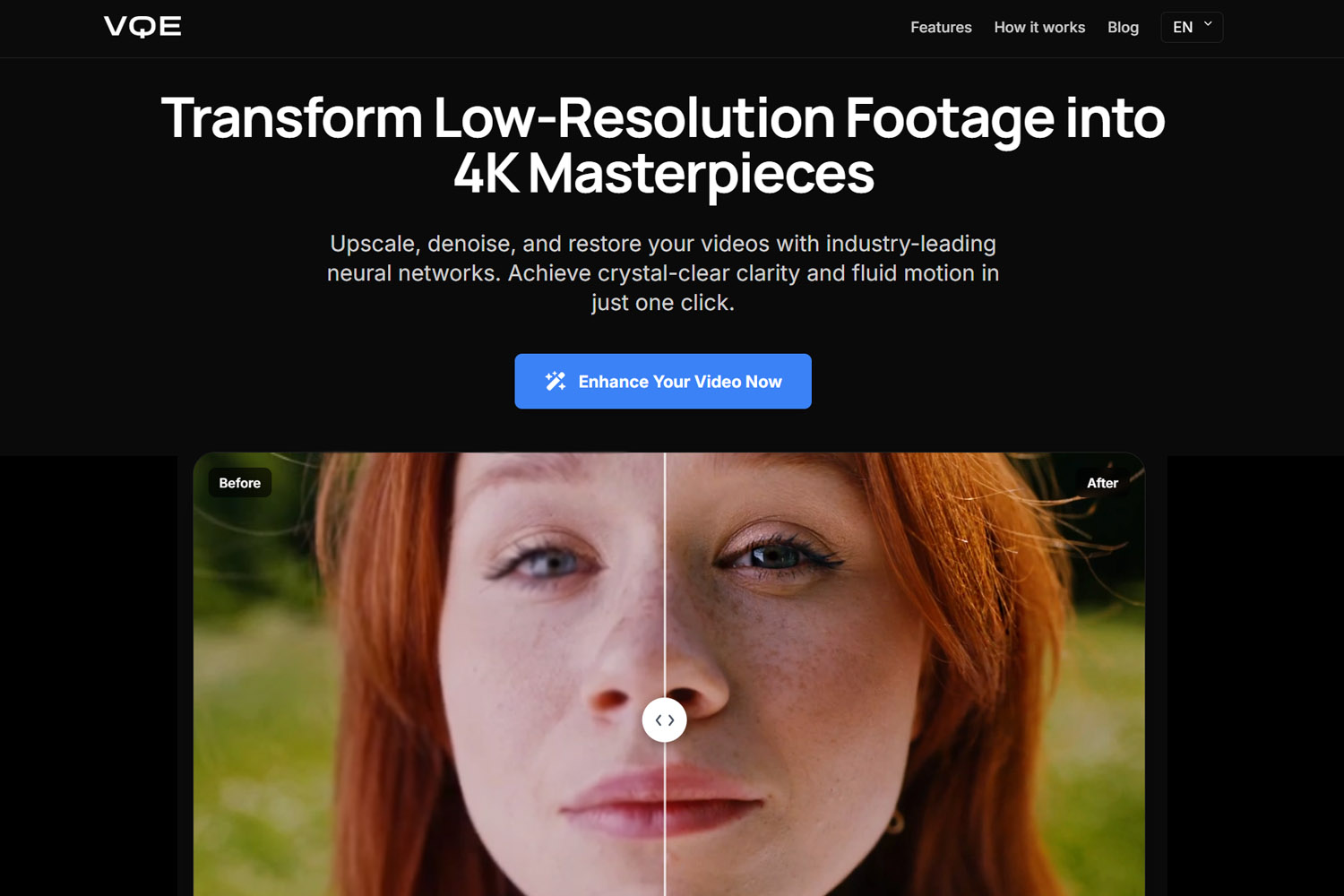
Beyond the CSI "Enhance" Meme
The "Enhance!" meme from crime shows represents an impossible fantasy from 2005 that's finally partially achievable in 2026. In 2005, mathematical interpolation could only stretch existing pixels. It couldn't create new detail. The technology simply didn't exist to reconstruct missing information in a convincing way.
Modern AI changes this equation entirely. AI doesn't recover lost pixels. Instead, it replaces them with better ones based on learned visual patterns. When you feed a low-resolution video to an AI enhancer, the neural network recognizes patterns (faces, textures, objects) and generates plausible detail that matches high-quality training data. This isn't restoration. It's intelligent reconstruction.
The Original Data Paradox
The fundamental paradox of video enhancement: improvement means plausible reconstruction, not restoration. If a video was recorded at 480p, there's no 4K version hidden in the data. The camera never captured that detail. Traditional upscaling methods acknowledge this limitation by simply stretching pixels, creating larger images without new information.
AI super-resolution works differently. Instead of stretching pixels, AI analyzes the content and generates new detail that looks natural and convincing. The AI recognizes "this is a face" and creates eyelashes, skin texture, and facial features based on how faces appear in high-resolution training data. The result looks dramatically better, but it's reconstructed detail, not recovered information.
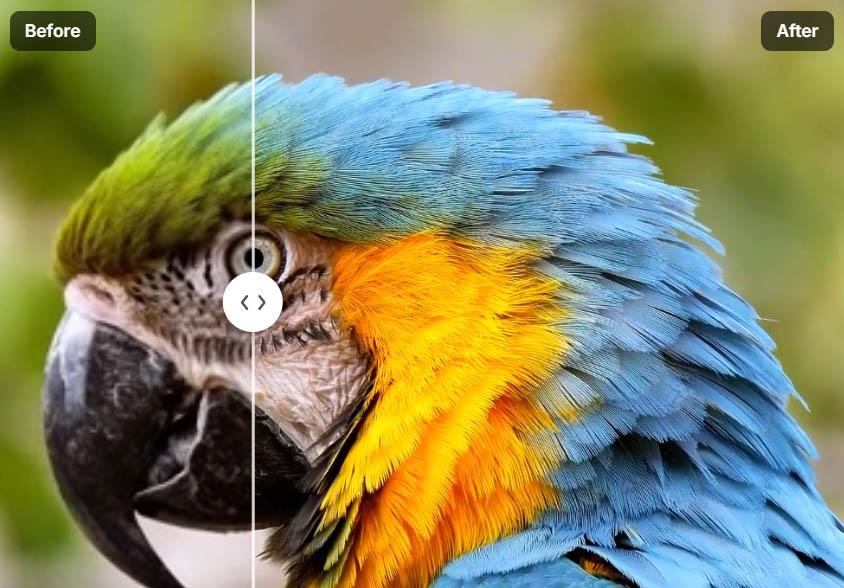
This distinction matters for understanding what AI enhancement can and cannot do. AI excels when the source material contains enough information for accurate pattern recognition, allowing the neural network to make educated predictions. When source material is too degraded, the AI has insufficient information to work with, leading to artifacts and unreliable results. Understanding this threshold helps you decide when enhancement is worth attempting, whether you're working with blurry footage that needs deblurring or low-resolution video that needs upscaling.
Traditional Upscaling vs AI Super-Resolution
Understanding the difference between traditional upscaling and AI super-resolution explains why modern tools produce dramatically better results and when each approach makes sense.
Traditional Methods: Bicubic and Lanczos Interpolation
Traditional upscaling methods like bicubic and Lanczos interpolation work like stretching a rubber band until it gets thinner. These algorithms use mathematical formulas to guess what pixels should exist between known points, creating a larger image by distributing existing information across more pixels. The bicubic interpolation algorithm uses cubic polynomials to estimate pixel values, while Lanczos resampling applies a windowed sinc function for smoother results.
The process is straightforward: if you have a 1080p image and want 4K, the algorithm creates four pixels from each original pixel using mathematical interpolation. More pixels, but no new information. The result is larger but not necessarily sharper, because you're spreading the same limited information across a bigger canvas.
This approach works acceptably for small upscaling factors (1.5x or 2x), but becomes problematic at larger scales. At 4x upscaling, traditional methods produce blurry, soft results because there simply isn't enough source information to create convincing detail through mathematical interpolation alone.
AI Super-Resolution: Repainting from a Blurry Sketch
AI super-resolution works like repainting a detailed image from a blurry sketch. Instead of stretching pixels, AI analyzes patterns and textures to generate new detail that fits the content type. The neural network recognizes what it's looking at (faces, buildings, nature) and creates plausible detail based on training data.
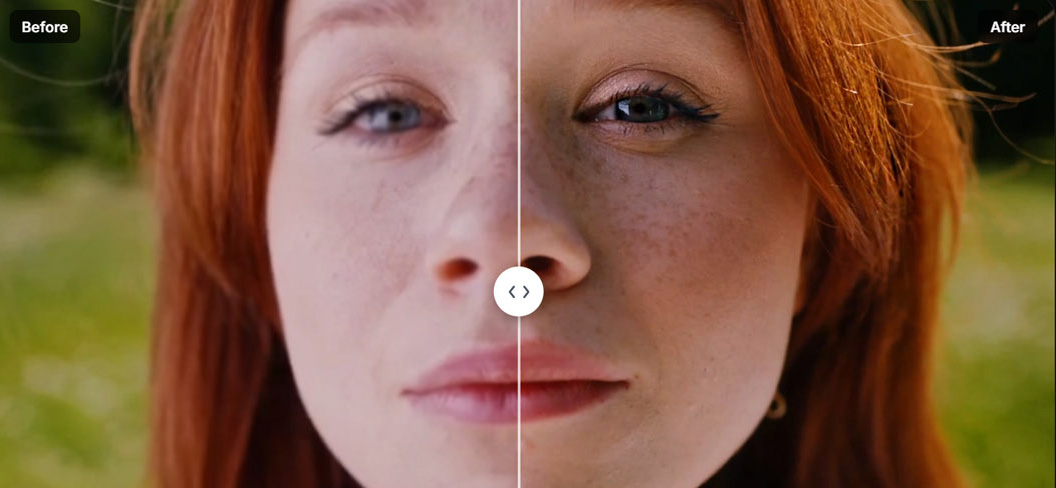
The key difference: AI super-resolution is based on learned visual patterns, not mathematical interpolation. When processing a low-resolution face, the AI doesn't just stretch pixels. Instead, it recognizes facial structure and generates eyelashes, skin pores, and fine details based on how faces appear in high-resolution training data.
This approach produces results that look dramatically more natural than traditional upscaling. The AI generates detail that matches the content type, creating textures, edges, and fine structures that look convincing to human viewers. The detail isn't "real" in the sense of being recovered from the original footage, but it's plausible and visually superior.
Super-Resolution: The Technical Term
Super-resolution is the technical term for AI-based resolution enhancement. It refers to the process of increasing spatial resolution beyond what the original sensor captured, using AI to generate plausible detail rather than simply stretching pixels. This distinguishes modern AI enhancement from traditional upscaling methods.
How Modern AI Video Enhancement Tools Actually Work
AI video enhancement in 2026 isn't a single algorithm. Tools like Topaz Video AI and Video Quality Enhancer combine multiple specialized systems working together to improve different aspects of video quality. Understanding these components helps explain why modern tools produce better results than earlier versions.
Spatial Enhancement: Resolution Upscaling
Spatial enhancement increases resolution by upscaling from lower resolutions (720p, 1080p) to higher ones (1080p, 4K). AI reconstructs missing detail instead of stretching pixels, analyzing patterns and textures to generate plausible high-resolution information.
The process works by recognizing content types and generating appropriate detail. A face gets facial features, skin texture, and fine details. A building gets architectural details, textures, and structural elements. The AI uses training data to predict what higher-resolution versions would look like, creating results that appear natural and convincing.
This works particularly well for 2x to 4x upscaling factors, where the AI has enough source information to make accurate predictions. Beyond 4x, results become less reliable because the AI has insufficient information to work with, leading to artifacts and unrealistic detail.
Temporal Enhancement: Motion and Frame Interpolation
Temporal enhancement improves motion smoothness by generating intermediate frames, converting 24fps footage to 60fps or creating slow-motion effects. AI generates intermediate frames while preserving natural motion, analyzing movement patterns to create realistic in-between frames.
This works by understanding how objects move through space. The AI analyzes motion vectors between frames and predicts what intermediate frames should look like, creating smooth motion that looks natural rather than artificially interpolated. The result is fluid playback that eliminates choppiness in low frame-rate footage.
Frame interpolation is particularly effective for simple, predictable motion like walking, driving, or camera panning. Complex scenes with many overlapping objects or fast motion blur can create artifacts, but well-implemented temporal enhancement produces convincing results.
Intelligent Denoising: Separating Grain from Noise
Intelligent denoising distinguishes between film grain (good texture) and digital noise (bad artifacts), preserving natural texture while removing unwanted noise. AI analyzes patterns across multiple frames to identify what's noise versus what's real detail, allowing selective removal that maintains visual quality.

This works because noise has specific characteristics: it's random, changes between frames, and appears as grain or color speckles. Real detail is consistent and follows patterns, allowing the AI to distinguish between the two. By analyzing multiple frames together, the AI can remove noise while preserving textures, edges, and important details.
The result is cleaner footage that maintains natural appearance, avoiding the plastic, over-smoothed look that traditional denoising methods produce. Modern AI denoising preserves film grain when appropriate while removing sensor noise and compression artifacts.
Face Recovery and Refinement
Face recovery uses specialized neural models trained on facial structure to enhance faces while maintaining natural appearance. These models stabilize eyes, skin texture, and expressions, preventing the "waxy skin" problem that plagues general-purpose upscalers.
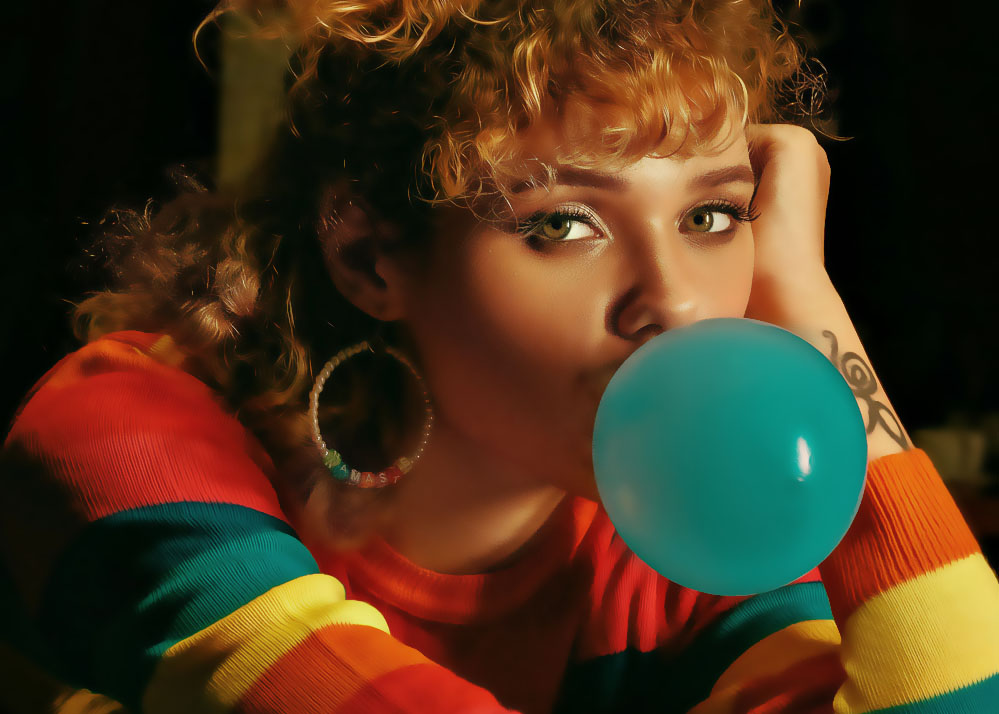
Professional tools use face-specific models because human brains focus intensely on faces. If faces look wrong, the entire video feels off, even if backgrounds are perfectly enhanced. Face recovery models recognize facial anatomy and generate detail that matches natural human features, maintaining realistic appearance throughout enhancement.
This is crucial for footage with people, especially interviews, portraits, or any content where faces are prominent. Without specialized face recovery, backgrounds might look 4K while faces remain blurry, creating a jarring disconnect that makes the entire video look worse than the original.
Image AI vs Video AI: Why Video Is Much Harder
Enhancing video is fundamentally more complex than enhancing images because video requires temporal consistency. Detail must remain stable across frames, not just look good in a single still image.
Why Frame-by-Frame Enhancement Fails
Processing each frame independently causes several problems that make video look worse than the original. Each frame enhanced independently creates flickering textures, crawling detail, and unstable faces that are immediately noticeable during playback.
The issue is that independent frame processing doesn't consider context. A texture might look sharp in one frame but different in the next, creating a shimmering effect that's distracting and unnatural. Faces might change appearance between frames, with eyes or skin texture shifting in ways that look wrong.
These artifacts are more noticeable than the original low quality, making frame-by-frame enhancement counterproductive. The video might have higher resolution, but the temporal inconsistencies make it look worse overall.
The Real Breakthrough: Temporal Consistency
Modern video enhancement tools solve this by analyzing multiple frames together, ensuring detail stays stable across time. Temporal consistency algorithms analyze the current frame along with several frames before and after, using information from surrounding frames to maintain stability.
Detail must stay stable across time, not just look good in a still image. This is why serious tools like Topaz Video AI and cloud platforms like Video Quality Enhancer focus heavily on temporal analysis. The enhancement process considers the entire sequence, not just individual frames.
This temporal awareness prevents flickering, crawling, and instability. Textures remain consistent, faces stay stable, and motion looks natural because the AI uses information from multiple frames to maintain coherence. The result is enhancement that looks good both in still frames and during playback.
Diffusion Models Explained
Diffusion models represent a significant advancement in AI video enhancement, offering superior detail generation compared to earlier GAN-based systems.
What Diffusion Models Really Are
Diffusion models are generative models trained to predict plausible visual detail through a process of iterative refinement. They work by learning to reverse a noise-adding process, gradually building up detail from low-resolution or noisy inputs.
These models are extremely strong at generating textures, faces, and fine structures because they're trained on vast datasets of high-quality images and video. The training process teaches them to recognize patterns and generate detail that matches natural appearance, producing results that look convincing to human viewers.
Stable Diffusion: Image Model, Not Native Video
Stable Diffusion is an image model, not a native video model, which creates challenges when applying it to video enhancement. When used for video, diffusion models are typically applied frame-by-frame, then combined with temporal guidance to reduce flicker.
This hybrid approach works but isn't ideal. Frame-by-frame diffusion can create temporal inconsistencies, requiring additional processing to maintain stability across frames. The temporal guidance helps, but it's a workaround for a model that wasn't designed for video.
The 2026 Cutting Edge: Hybrid Pipelines
Advanced tools in 2026 use hybrid pipelines that combine classical video super-resolution with diffusion-based detail refinement. This approach goes beyond older GAN-only systems, leveraging the strengths of both classical and generative methods.
The hybrid approach works by using classical super-resolution for base enhancement, then applying diffusion models for detail refinement. This produces results that are both stable (from classical methods) and detailed (from diffusion models), creating enhancement that looks natural and convincing.
When AI Goes Too Far: The "Fake" Look Problem
AI enhancement can produce artifacts that make video look artificial, particularly when processing is too aggressive or when source material is too degraded.
Common Failure Modes
Artifacting occurs when AI misinterprets patterns, creating detail that doesn't match the content. Bricks might appear where there are none, fabric textures might be generated incorrectly, or patterns might be created that look unnatural.
Waxy skin happens when AI removes natural pores and texture, creating a plastic appearance that's immediately noticeable. This occurs when enhancement algorithms smooth too aggressively, removing the fine variations that make skin look real.
Over-sharpening creates detail that looks painted on, with edges that are too crisp and textures that appear artificial. The detail might be technically "correct" but doesn't match natural appearance, creating an uncanny valley effect.
The Modern Solution: Controlled Enhancement
Professional tools address these problems through controlled enhancement strength and film grain preservation. Controlled enhancement allows users to adjust processing intensity, finding the balance between improvement and natural appearance.
Film grain preservation or re-injection maintains natural texture that might be lost during processing. Some tools can analyze and preserve original grain, or add synthetic grain back after enhancement, maintaining the natural look that viewers expect.
Professional tools expose tuning controls to avoid over-processing, giving users control over enhancement parameters. This allows fine-tuning that produces natural results rather than artificial-looking enhancement.
Real-World Benchmarks: What Different Tools Can Achieve
Understanding what different tools can actually achieve helps set realistic expectations and choose the right approach for your footage.
Low-Quality Sources: VHS, MiniDV, 480p
Low-quality sources show large perceptual improvement when enhanced with modern AI tools. VHS tapes, MiniDV footage, and 480p videos can be upscaled to 1080p or 4K with results that look dramatically better than the original.
The results are still stylized, not magically modern. Enhanced footage maintains the character of the original while looking significantly sharper and cleaner. The AI can't completely eliminate the limitations of the source material, but it can create results that are visually superior and more watchable.
This works best when source material has minimal compression artifacts and reasonable focus. Heavily degraded footage with severe compression or motion blur will produce less impressive results, but even in these cases, modern tools can create noticeable improvement. When dealing with blurry footage, understanding the type of blur helps determine whether enhancement will be effective.
Mid-Quality Sources: 1080p Smartphones, DSLRs
Mid-quality sources achieve near-native 4K perceptual quality when enhanced with professional tools. Modern smartphone footage and DSLR video recorded at 1080p can be upscaled to 4K with results that look nearly as good as native 4K footage.
This is where tools like Topaz Video AI and Video Quality Enhancer shine most. The source material contains enough information for accurate AI predictions, allowing the tools to generate detail that looks natural and convincing. The enhanced footage maintains the character of the original while achieving higher resolution and perceived quality.
The key is starting with decent source material. A 1080p video recorded at high bitrate will upscale better than a 1080p video recorded at low bitrate, because the higher bitrate preserves more information for the AI to work with.
Metrics vs Human Vision: Why "Looks Better" Matters
AI-enhanced video may score lower on technical metrics like VMAF while looking dramatically better to human viewers. This paradox reveals why perceptual quality matters more than pixel-level accuracy.
The Accuracy Paradox
AI-enhanced video may score lower on metrics like VMAF because the enhancement process creates detail that wasn't in the original. Technical metrics measure accuracy to the source, but AI enhancement intentionally creates new detail, which can lower accuracy scores. The VMAF (Video Multi-method Assessment Fusion) metric developed by Netflix combines multiple quality measurements to predict human perception, but it measures fidelity to the source rather than perceptual improvement.
Yet the enhanced video looks dramatically better to human viewers, who care more about clarity, faces, and motion stability than pixel-level accuracy. This creates a situation where technical metrics suggest lower quality, but human perception indicates higher quality.
Why This Happens
AI prioritizes perceptual quality, not pixel-level accuracy. The enhancement process is designed to create results that look good to humans, not to match the original pixel-by-pixel. This means AI might generate detail that improves perceived quality even if it reduces technical accuracy.
Humans care more about clarity, faces, and motion stability than about whether every pixel matches the original. If a face looks sharper and more natural, viewers perceive higher quality even if the enhanced version doesn't match the original pixel-for-pixel. If you're unsure whether your footage is suitable for enhancement, ChatGPT can help analyze your video quality and recommend the right approach.
This distinction matters for understanding enhancement results. Technical metrics provide one perspective, but human perception provides another, and for video enhancement, human perception is what ultimately matters.
How to Tell If a Video Enhancement Tool Is Actually Good
Most reviews focus on output quality but ignore critical factors that determine whether enhancement actually improves video or introduces new problems.
The Tests Most Reviews Ignore
Temporal flicker testing checks whether texture shimmers between frames. A good enhancement tool maintains stable textures throughout the video, while poor tools create flickering that's immediately noticeable during playback.
Face stability testing verifies whether eyes and skin remain consistent across frames. Faces should look stable and natural throughout the video, not changing appearance between frames in ways that look wrong.
Motion integrity testing ensures no warping during fast movement. Enhanced video should maintain natural motion, with objects moving smoothly without distortion or artifacts during fast action.
Pro-Level Insights
Reference frame analysis reveals how AI borrows detail from nearby sharp frames. Advanced tools analyze multiple frames to find the sharpest version of each element, then use that information to enhance other frames. This creates more accurate enhancement than processing each frame independently.
Avoiding over-cooking means subtle enhancement beats aggressive reconstruction. The best results come from moderate enhancement that improves quality without introducing artifacts. Aggressive processing might create more detail, but it often looks artificial and reduces overall quality.
Hardware reality check: local tools require powerful GPUs, while cloud platforms remove this barrier entirely. Desktop software like Topaz Video AI needs NVIDIA RTX series or Apple Silicon GPUs for practical processing speeds. Cloud solutions like Video Quality Enhancer eliminate hardware requirements, making professional enhancement accessible regardless of local setup. If you're working with ChatGPT to guide your enhancement workflow, it can help you choose between local and cloud approaches based on your hardware.
Final Verdict: Can AI Really Improve Video Quality?
The answer is yes, but with important caveats that explain when enhancement works and when it doesn't.
AI Doesn't Restore Lost Reality
AI doesn't restore lost reality. Instead, it reconstructs believable detail. If a video was recorded at 480p, there's no 4K version hidden in the data. The camera never captured that detail. AI enhancement creates plausible detail based on training data, not recovered information.
This distinction matters for understanding what enhancement can achieve. The enhanced video represents what the AI thinks should be there, not necessarily what was actually captured. This is reconstruction, not restoration.
When Done Correctly, Results Are Stable, Natural, and Visually Superior
When done correctly, AI enhancement produces results that are stable, natural, and visually superior. Modern tools with temporal consistency create enhancement that looks good both in still frames and during playback, maintaining natural appearance throughout.
The key is using the right tool for your source material and applying appropriate enhancement strength. Professional tools with proper temporal analysis produce results that look convincing and natural, avoiding the artifacts and instability that plague frame-by-frame processing.
AI Video Enhancement Isn't About Truth: It's About Convincing Clarity
AI video enhancement isn't about truth. It's about convincing clarity. The goal isn't to recover lost information but to create results that look better to human viewers. If the enhanced video looks sharper, cleaner, and more natural, it has achieved its purpose, even if the detail is technically "hallucinated."
This perspective helps set realistic expectations. AI enhancement creates believable, visually superior results, not perfect reconstructions of lost information. The technology works best when source material contains enough information for accurate pattern recognition, allowing the AI to generate detail that looks natural and convincing.